

To help define a technology roadmap, we evaluated your CMS and related technologies, researched potential search vendors, mapped existing CRM tools, and considered the competitive landscape.
The system itself, code repositories, development workflow, relevant developer documentation, add-ons, and third party tools.
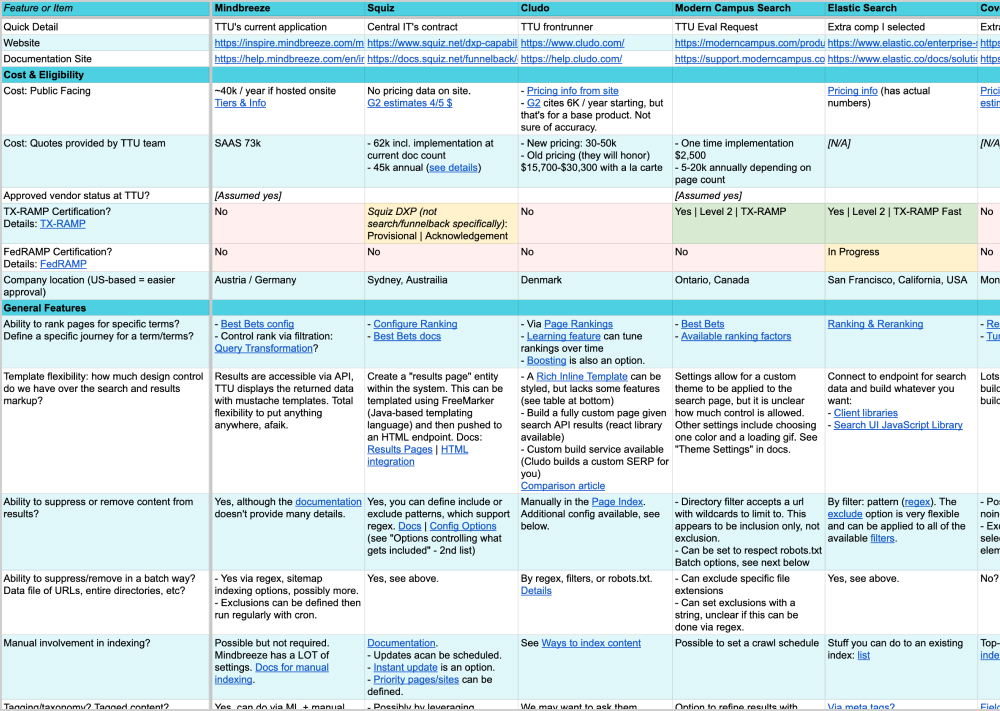
We analyzed the features of seven enterprise search tools to help TTU make an informed search vendor decision.
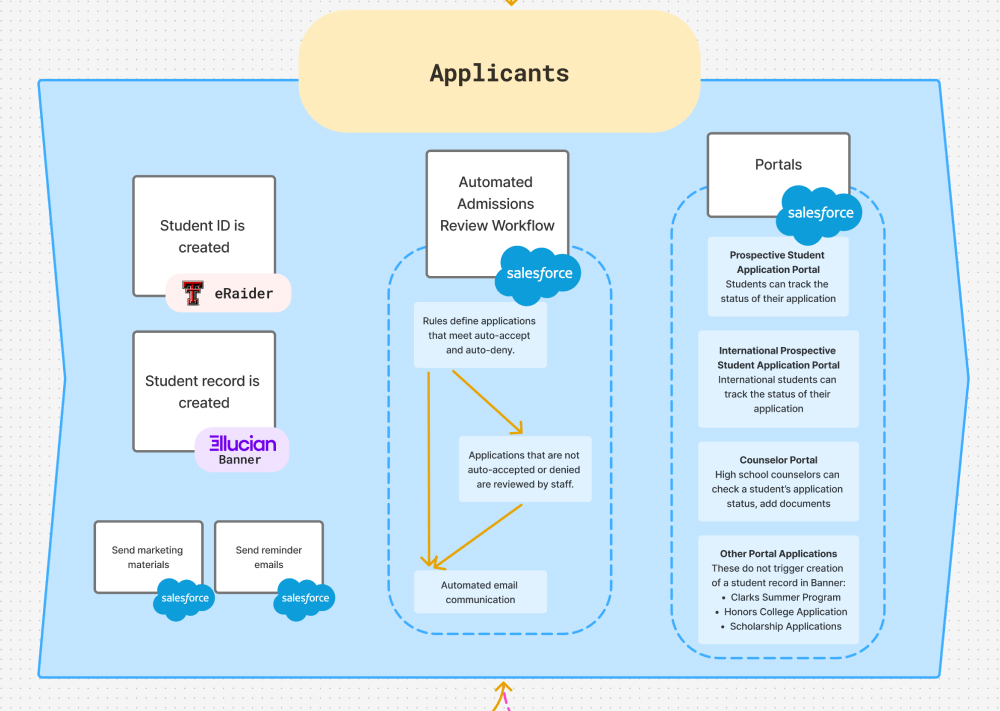
We mapped the current known CRM ecosystem to help identify opportunities for improvement and growth.
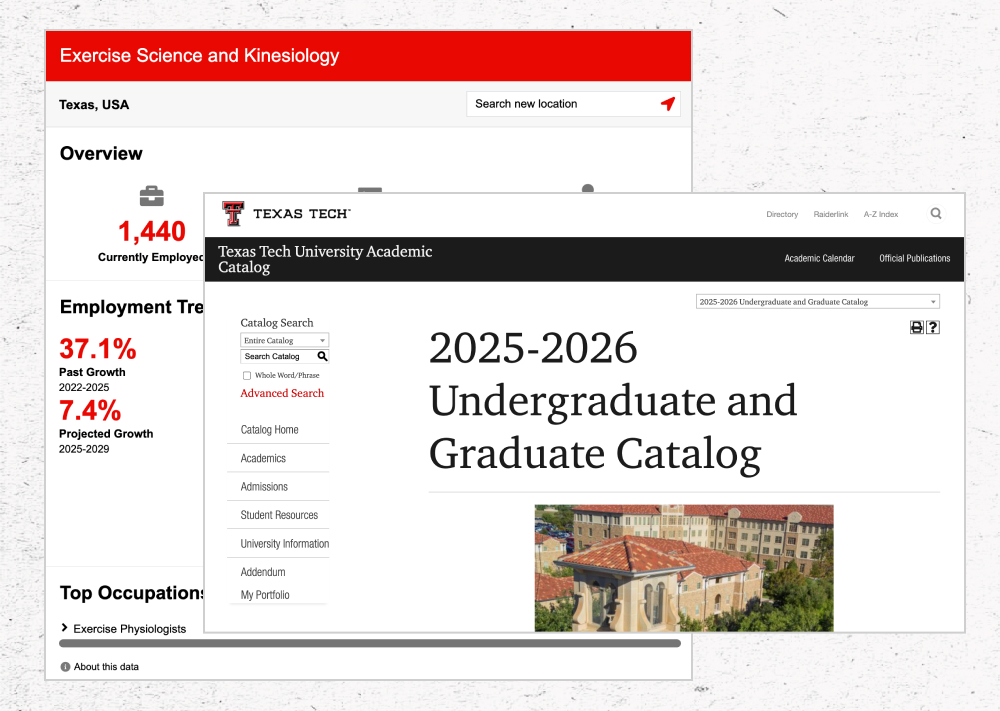
Other areas of brief research related to technology topics.
Insights from Technology Review
1. Leverage Taxonomy Tags
There are currently 2,000+ tags in the system now. Use these strategically: administrate their creation and use. Build a meaningful term hierarchy, then use it to find and serve content.
2. Start Organizing Assets & Components
The current CMS has 299 assets and 129 components. That's not necessarily a lot, especially for a site this size, but many are named and associated with specific sites and aren't for general use.
Weed components with duplicate purpose/functionality. Generalize specific assets and components. Decouple assets and components from specific sites, and associate with features. For example, revise “College of Engineering CTA” to “CTA with [feature]." Encourage the use of assets and components amongst web editors on all sites, and use them to model DRY (don't repeat yourself) habits.
3. Review Users & Groups
There are currently 828 CMS users in 924 groups. Almost all users have Level 8 / “Designer” access to the CMS. Could we leverage the other levels to support enforcement of web standards? Are groups being utilized effectively? The group-to-user ratio seems off.
Given your team’s familiarity and history with Modern Campus, it’s hard to make a reasonable argument against keeping it. We’d recommend switching only if Modern Campus failed to meet your technological goals.
If you did switch to a new CMS, Drupal is likely the best alternative. We recommend test-driving Drupal on a microsite or small project before committing to a full rebuild.
Based on our evaluation of seven search vendors, Cludo is our recommended search tool.
Data & Strategy: The insights you’ll gain from the reporting tools will be valuable as you work toward improving content strategy.
Control & Intervention: Cludo will give you tools to wrangle search queries and own the search journey while you work on detangling your content.
Tech focus: Cludo is an actively developed tool with good documentation and support resources. Some highlights from the product roadmap include: React component library, conversion funnel tool.
Share the CRM map with Enrollment Management and confirm the details are correct.
Share the map with your Salesforce account team. Are there any areas where we could reduce redundant tools, or eliminate manual data entry?
Career Pathways
Our student KJ sessions showed this content is important to prospective students, and validated the implementation of the widget. The widget itself is accessible, scalable, and straightforward to theme. We recommend you continue to roll this out to program pages beyond Online+.
Course Catalog
Modern Campus has a Widget API that allows you to connect to your catalog data and embed it elsewhere on your site. We recommend using this API to serve details about degree paths and key courses directly from the catalog on pages where it’s strategically advantageous to do so. Objective: avoid repetition, outdated content, and reduce editor workload.
Some third party tools and subscriptions in use across TTU sites may be redundant or unnecessary. We recommend evaluating third party apps and tools in use across all sites in a "Rocket Money" style audit. This may help us identify redundancies and consolidate where possible. The savings on subscriptions and implementation time could be used to invest in strategic areas like search analytics.
Newly admitted students are overwhelmed by the many sign ups and portals involved in the onboarding process. While this is not technically "the website," it's part of their experience and they don't differentiate it. We recommend a deeper audit into these tools to see if this can be streamlined, or if there's a better way to guide students through the process.
We recommend a move to cloud hosting from on-site servers.Continue to explore Modern Campus hosting. A separate enterprise hosting vendor is a good idea if you want to host non-Modern Campus sites. If so, we recommend Digital Ocean, Cloudflare, or Azure. We have not evaluated these vendors with a TTU-specific rubric like CMS and search, but this is an option for future research.
Insights from Tech Roadmap
Your team's technical knowledge: it is an asset to have the institutional knowledge of many long-term staff members who understand how we got here. They have a deep familiarity with Modern Campus and with TTU's technical history. Continue investing here: Shadowing for new or reassigned staff, continue professional development: conferences, training, etc.
Global Template Process: Continue with this concept, but expand:
Offering a design system that is system-agnostic and powered by design tokens will empower site owners to tell their story within the bounds of brand guidelines and code standards. Similar to the global template, such a system can be developed iteratively and strategically applied to existing sites over time.
Build your Modern Campus assets & components from design system elements. Slowly replace old assets and components by equipping web teams across campus to leverage the design system themselves.
What does that workflow look like?
Ideally: all code lives in version control, and that version-controlled code is deployed to the site’s staging and production servers automatically. Site editors don’t touch code or styles. A robust design system addresses their site’s needs and content strategy, and they leverage the system’s components via Modern Campus’s layout and component infrastructure. Large campus entities with their own brand identities can make significant thematic adjustments via design tokens without code repetition. The web team within Marketing & Communications maintains and expands the system, evangelizes it to the community, and facilitates adoption. The design system is decoupled from Modern Campus so it can be consumed by other systems.
Also every day there’s a rainbow and all admitted students are issued a unicorn.
This is a long term goal. The path to that ideal is not easy or short, but it is possible.
As with content governance, a strict workflow should be enforced when pushing code to the site. It is possible to do this without having to be a big mean jerk about it.
Define the rules, then set up technologies to automate their enforcement. Utilize linters, branch protection rules, and integration tests. Publish the what and why. Make it clear to contributors what the rules are. Share why you have that rule: what (or who) it protects or serves. Consider enforcement as a teaching tool for the community. Connect and demonstrate how “following the rules” leads to sites that achieve their department’s goals.
A design system carefully implemented within your CMS will put the right tools close at hand. Providing good, functional tools with clear documentation and training will make site owners more likely to do the right thing by default.
Objective: foster a community where web editors on campus want to come to you for advice, best practices, and training. Be seen as a empathetic, helpful, uniting resource, not a controlling entity doling out rules and rejecting pull requests (even when you are).
This is already a path you’re on. It’s possible that you’re already there. Continue inviting the community into the process with Teams chat, quarterly meetings, and available documentation.